Winn-Dixie
4.010.09KReviews
Analysis ByAppCompare
Shopping for groceries is one of those tasks where a small amount of planning can make a noticeable difference. The Winn-Dixie app is built around that idea: it brings planning, shopping support, and points earning into one place for customers of the supermarket chain. I found it most useful when I treated it as a preparation tool rather than something to keep open throughout an entire store visit.
As a free lifestyle app from The Winn-Dixie Company, it is aimed at people who already shop at Winn-Dixie and want a more organized way to approach their trips. Its Everyone age rating also makes it suitable for a broad household audience. The app has reached over a million installs, with a 4.0 average from around forty-two thousand ratings, so it has clearly become a familiar companion for many shoppers rather than a niche experiment.
How Winn-Dixie feels in everyday use
Quick enough for planning, with a better experience when you keep tasks focused
My first impression is that the app makes the most sense when used in short sessions. I would open it before leaving home, look through the available shopping information, prepare what I needed, and then close it. That workflow feels more natural than expecting it to replace every part of a supermarket visit.
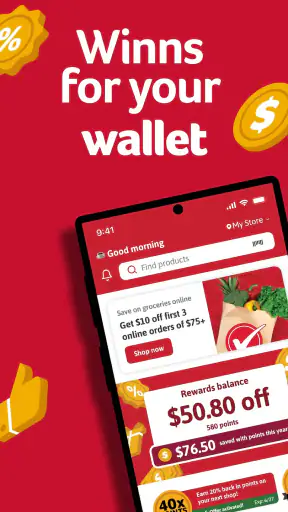
The app’s central appeal is the connection between planning a shop and earning points that can help reduce the cost of future purchases. That combination gives the planning stage a practical purpose. I am not simply making a list for the sake of organization; I am also checking whether my intended trip can be made more efficiently.
In normal use, I would expect the app to feel responsive enough for browsing and checking account-related information, but speed is not the only factor that matters here. Grocery apps often feel slower when they are handling several kinds of information at once, especially when a user moves between shopping details and rewards activity. I found it better to make one decision at a time instead of rapidly jumping between every available area.
A useful habit is to prepare the trip while you still have time to think. If I wait until I am standing at the entrance with a full trolley, the app becomes one more thing competing for attention. If I use it earlier, I can decide what I want, review the points-related side of the trip, and arrive with a clearer plan. The biggest performance benefit comes from using it before the busy part of shopping begins.
A realistic supermarket routine
Imagine planning a midweek shop after work. I would open the app at home, review the items I expect to buy, and check the parts of the account that may affect how I shop. I could then group my decisions mentally by aisle or by meal rather than repeatedly stopping to reconsider everything inside the store.
That approach also helps with phone battery and attention. A grocery app does not need to be an entertainment app that stays active for hours. Its value is concentrated in a few moments: planning, checking, and confirming. Once I have what I need, I can put the phone away and shop normally.
For a family, the same workflow can prevent duplicated purchases. One person can do the preparation, while another uses the resulting plan in the store. The app is especially helpful when the household regularly shops at the same Winn-Dixie location and wants a repeatable routine rather than starting from scratch every time.
What happens during heavier use
The most demanding moments are likely to occur when I combine several tasks in one session: reviewing shopping information, checking points, and making changes while moving around the store. That is where any grocery app can become less comfortable, not necessarily because it is failing, but because the user is asking it to function as a planner, reference tool, and rewards companion at the same time.
I would avoid opening it for the first time during a rushed checkout situation. If I need to understand how a points-related action works, it is better to do that beforehand. This is a practical limitation of the app’s role: it supports the shopping process, but it does not remove the need for a little preparation.
Another useful trade-off is keeping the shopping session simple. Rather than constantly switching views, I would check the information I need, make a mental note of the next action, and return to the physical shopping task. This reduces the chance of losing track of the basket or blocking an aisle while concentrating on the screen.
People who enjoy detailed price comparison across several supermarkets may find the experience less complete than using a general comparison service alongside a store app. Winn-Dixie is naturally focused on its own shopping environment. That focus is an advantage when I already intend to shop there, but it is a limitation when I want one neutral tool covering multiple chains.
Stability matters more than flashy extras
For this kind of app, reliability means being able to return to the same shopping routine without unnecessary confusion. I value an app that lets me prepare calmly, check my points-related progress, and recover from an interrupted session without making me reconstruct everything.
I would still treat any mobile shopping tool as something that deserves a backup plan. A written note or a basic list on the phone is sensible if I am buying ingredients for a specific meal or shopping under time pressure. That is not a criticism unique to Winn-Dixie; supermarket apps depend on a phone being available and usable at the moment I need them.
If the app stops responding or I lose connectivity inside the store, the most practical recovery is to continue with the list I prepared earlier and revisit the account information later. This is another reason not to make the app the only place where I keep essential details. The strongest workflow is one where the app improves the trip without making the trip impossible when the screen is unavailable.
Its established audience is reassuring in a general sense. An average rating of 4.0 across roughly forty-two thousand ratings suggests a broadly useful experience with some room for individual frustrations. I would read that as a sign that the app works well for many regular shoppers, while also remembering that grocery needs and expectations differ widely.
Device requirements and practical constraints
The current version is 8.0.210, and the app requires Android 8.0 or newer. That makes device compatibility an important first check for anyone using an older Android phone. A newer handset should generally be a more comfortable choice for shopping tasks, especially if the phone already has limited storage or struggles with other apps.
I would not describe this as an app that should demand exceptional hardware. Planning a grocery trip and checking points are relatively focused activities. Even so, the overall experience can be affected by the phone itself: an older operating system, low free storage, a crowded background workload, or a weak connection can make any retail app feel less dependable.
For a smoother session, I would update the app when convenient, keep enough free storage for normal phone operation, and prepare important shopping information before leaving home. These are simple steps, but they matter more than chasing maximum speed. A grocery app has to be available at the right moment, not merely fast under ideal conditions.
People who use iPhones should pay attention to the version available for their device before planning around it. My assessment here is centered on the Android release and its stated Android requirement. The key point for any shopper is to confirm that the phone they carry to the store can run the app comfortably before relying on it for a time-sensitive trip.
Where it beats ordinary alternatives
A paper list is still excellent for speed and reliability. It starts instantly, uses no battery, and cannot distract me with unrelated information. A basic notes app is similarly flexible and works for any supermarket. If all I want is to remember milk, vegetables, and household supplies, those alternatives may be simpler.
Winn-Dixie becomes more compelling when I want store-specific planning connected with points earning. A generic notes app cannot give that shopping context by itself. The benefit is not that it replaces every other tool; it is that it brings the supermarket’s own planning and rewards relationship closer to the moment when I decide what to buy.
Dedicated budgeting apps can also be better for people who need a complete household spending picture across different stores. They may offer broader expense tracking, while this app is more directly tied to the Winn-Dixie shopping experience. I would choose the supermarket app for store-focused preparation and use a separate budgeting tool if I needed a full financial overview.
That distinction helps clarify who should skip it. If I rarely shop at Winn-Dixie, the store-specific focus may not justify another app on my phone. Likewise, shoppers who prefer paper lists, do not care about points, or regularly compare several retailers may get more value from a neutral list or budgeting tool.
Small workflow choices that improve the experience
My first tip is to separate planning from browsing. I would decide what I actually need before exploring optional shopping information. This keeps the app from turning a short preparation session into an unfocused search and makes it easier to notice whether the trip is being shaped by genuine needs or by tempting extras.
My second tip is to check points before finalizing the trip rather than only after shopping. That gives the rewards side a chance to influence the plan in a deliberate way. It also reduces the risk of reaching the checkout and realizing that I had not paid attention to the information that mattered to me.
My third tip is to keep a simple backup list outside the app. I would not copy every detail; I would record the essentials that would make the trip possible if the phone became unavailable. This is particularly useful for a large shop, a meal with fixed ingredients, or a household where another person may need to finish the trip.
My fourth tip is to use the app in a stable location before entering the store. At home or during a quiet break, I can concentrate better and avoid making decisions while blocking movement in a crowded aisle. The app is more useful when it supports the shop from the background instead of demanding constant attention during it.
Who will get the most from it
I would recommend it first to regular Winn-Dixie customers who want one store-focused place for planning and points. It is also a sensible choice for people who make recurring grocery trips and want to develop a consistent routine. The free price removes the main financial barrier to trying it, so the decision largely comes down to whether the store-specific features fit the way you shop.
It can also suit households that divide shopping duties. One person can prepare the trip, while another handles the physical shopping. The important thing is to agree on a shared routine, because the app is most helpful when everyone knows whether it is being used for the list, the rewards side, or both.
I would be more cautious recommending it to someone who shops at many different chains or wants detailed nutritional, budgeting, or meal-planning tools in one application. Those needs call for broader software. This app is strongest when the supermarket itself is the center of the routine.
My performance verdict
After using it as a planning and shopping companion, I see Winn-Dixie as a focused tool rather than an all-purpose grocery manager. Its perceived speed is best when I use it in short, purposeful sessions. Its resource demands should be manageable for compatible phones, but an older device or a poor connection can still affect the experience. The most reliable approach is to prepare before the store visit and keep a basic fallback for essential items.
The app’s age rating is Everyone, its price is free, and it comes from The Winn-Dixie Company, which makes its purpose clear: support shoppers already connected to this supermarket. I like the way points earning gives the planning process a practical reason to exist, rather than leaving the app as just another digital list.
My final recommendation is straightforward. If Winn-Dixie is one of your regular stores, install Winn-Dixie and give it a few planned shopping trips instead of judging it during a rushed checkout. Use it before leaving home, keep the session focused, and maintain a simple backup list. If you need cross-store comparisons or a complete household budget, pair it with a broader tool or choose that alternative instead.
For the right shopper, Winn-Dixie earns its place by connecting preparation with points in a way a paper list cannot. It is not the answer to every grocery problem, but it can make routine trips feel more deliberate, especially when I use it as a calm planning aid rather than expecting it to manage the entire shopping experience.
FAQ
What is the Winn-Dixie app used for?
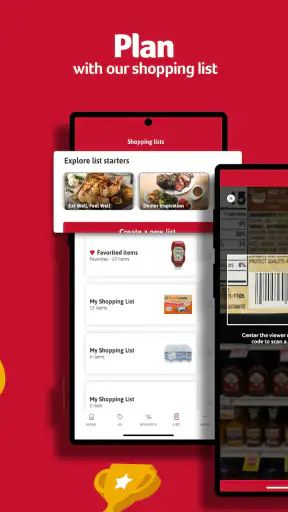
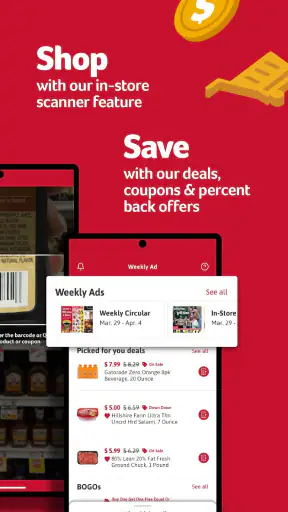
The Winn-Dixie app is designed to make grocery shopping easier for customers of participating stores. After signing in, you can browse weekly savings, view available digital coupons, create shopping lists, check product information, and manage rewards connected to your account. It is especially useful for planning a trip before visiting the store and keeping discounts organized in one place.
Do I need an account to use the Winn-Dixie app?
Some basic information may be visible without signing in, but an account is generally required to access the app’s most useful features. Creating or using an account allows you to connect your rewards profile, save digital coupons, build shopping lists, and receive offers associated with your store activity. Make sure your personal details and loyalty information are entered correctly.
How do Winn-Dixie digital coupons and rewards work?
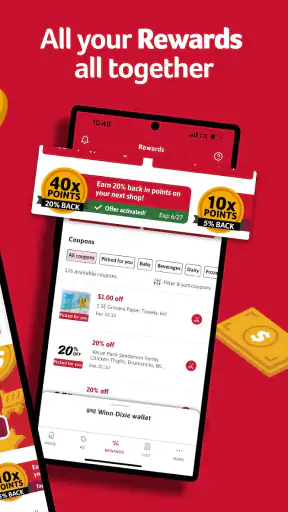
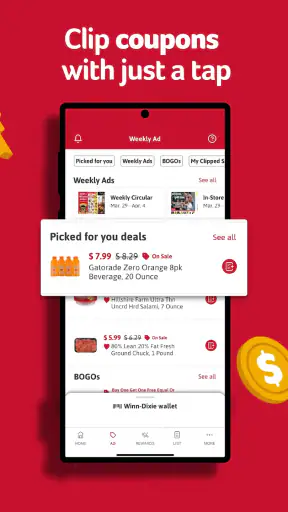
Digital coupons and rewards are typically linked to your Winn-Dixie loyalty account. You can browse available offers in the app, select the coupons you want, and then identify your account at checkout using the related phone number, card, or digital method supported by the store. Always check the expiration date, product requirements, quantity limits, and participating locations before shopping.
Can I use the Winn-Dixie app to find a store or plan my shopping trip?
Yes, the app can help you locate nearby Winn-Dixie stores and prepare for a visit. Store details may include the address, contact information, opening hours, and available services, although information can vary by location. The shopping-list tools are also helpful for organizing items before you leave, but product availability and prices should be confirmed at the selected store.
Is the Winn-Dixie app free, and is it available for both Android and iPhone?
The Winn-Dixie app is generally free to download and use, with no separate subscription required for its standard shopping, coupon, and rewards features. Availability may depend on your country, device compatibility, and the current app-store listing. Before downloading, check that your Android or iPhone meets the required software version and review the permissions requested by the application.
Pros
- Digital deals and coupons can lower the cost of regular grocery purchases.
- Store locations and opening hours are easy to check from the app.
- Shopping lists help organize items before visiting a Winn-Dixie store.
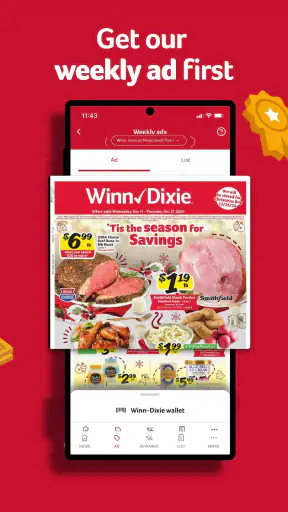
- Weekly ad browsing makes it easier to plan meals around current promotions.
- The app provides convenient access to rewards and personalized savings.
Cons
- Some features may depend on having a Winn-Dixie rewards account.
- Coupon terms and exclusions can be easy to overlook before checkout.
- Prices and promotions may vary by store or change without notice.
- The app is less useful for shoppers outside Winn-Dixie service areas.
- Certain functions may require an internet connection while shopping.